

 ® DoveSoft Computing April 2011









The Flex Rich Text Editor control can be used
to create formatted text for use in an Xara
Xtreme placeholder.
■ As text is entered in the “top” box, the HTML
is generated in the box below after clicking the
update button.
■ Format the text as required. For example,
font type, size, colour, decoration, justification
and hyperlinks can be applied.
■ On completion, select and copy from the
bottom box and paste into a placeholder
Replace with HTML code in Xara Xtreme.
Any text can be pasted into the “top” box after
visiting website TextFixer to “tidy” the text. This
website features text and html making,
changing, converting, generating tools
designed to save you time making web pages
or preparing text for web publication or other
uses.
Using Favicons in Xara Xtreme -
■ Icons can be created at website Favicon.
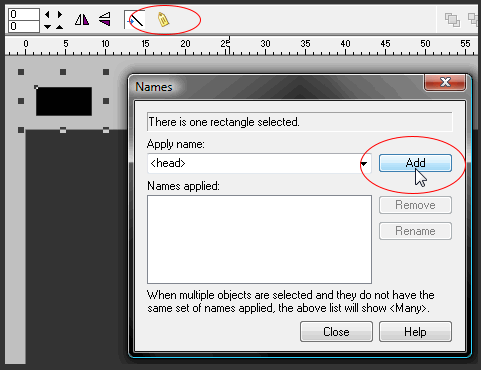
■ Create a placeholder and assign the name
<HEAD> (see image below).
■ In the placeholder Replace with HTML code
enter <link rel=”shortcut icon”
href=”iconname.ico” type =”image/x-icon”/>